






[July 7th, 2021]
In the latest update (v5.5.0) released for the D’CENT mobile app, we have made few improvements to enhance the user experience when using the Discovery Tab (the DApp browser).
Update Mobile App
- Android mobile app v5.5.0 or higher
: Click to update or install - iOS mobile app v5.5.0 or higher
: Click to update or install
Improvements in the Discovery Tab
1) Favorite (bookmark) function
Discovery Tab is a browser where users can access DApp services by connecting wallet account(s). Users can save the visiting service site as a favorite (or bookmark), which creates a shortcut for faster access the next time.

The screenshots above show the difference in the UI when the user adds a site bookmark which is displayed under the ‘Favorites’.
Specifying the network to a service bookmark
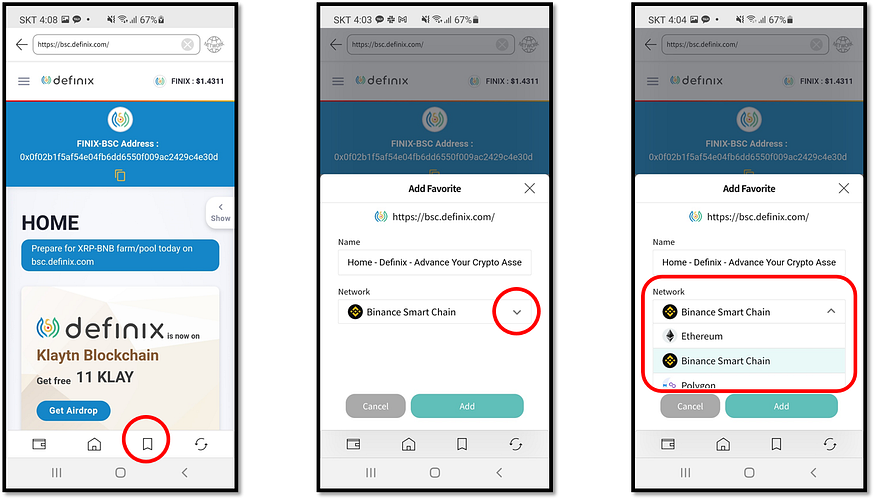
- Visit a service site (for example, Definix dex which operates on the ‘Binance Smart Chain’ network).
- From the site, press the bookmark button located in the bottom menu.
- When adding a bookmark, a user can specify which blockchain network the service operates on. In the case of Definix, it operates on the Binance Smart Chain network.
Specifying the network to a service bookmark will always use the specified network’s wallet account when connecting to the site via the shortcut that is created. This method removes the hassle of manually changing the network setting when accessing multiple services that belong to different networks.
2) Clear Discovery Cache
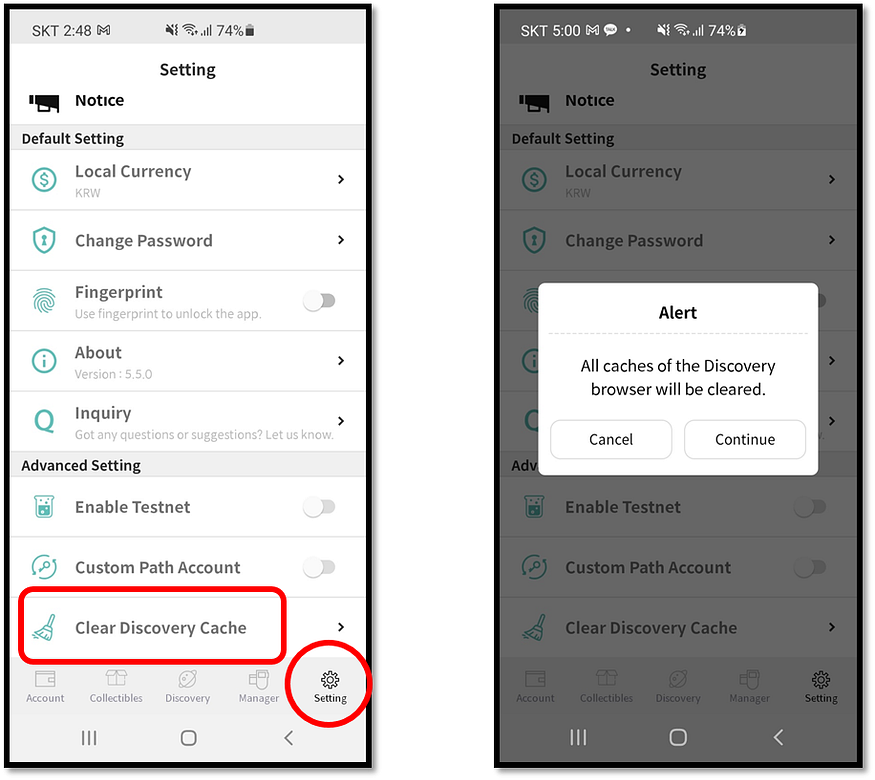
Discovery (dapp browser) cache clearing function has been added in the Settings Tab. Clearing the cache does not delete the shortcuts saved in the Favorites menu.
3) WalletConnect is now supported for both iOS and Android
For more information on how to use WalletConnect, please refer to the D’CENT User Guide below: