
Did you find this article helpful?
Sharing it takes less than 20 seconds, but we spent over 20 hours crafting it to bring you valuable insights. Help others by spreading the knowledge! 🚀


The new feature that can use RSK based Dapp in the D’CENT Mobile App has been released. With this update, you can enjoy RSK based Dapp services by connecting them through D’CENT Wallet.
You can access the RSK based Dapp site from the Dapp browser in the Discovery tab of the D’CENT Mobile App or connecting the services through WalletConnect feature.
This feature is supported on Android app v4.4.0 or higher, and iOS app will be updated later.
To use RSK based Dapp services, you need to change the network setting of the Discovery tab to RSK.
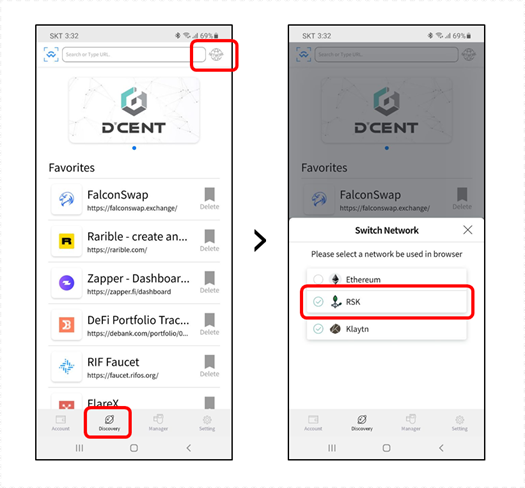
After changing the network settings, you can either enter the URL of the RSK Dapp service or use the Dapp Service through the WalletConnect QR scan.
If you want to know more about WalletConnect, please read the previous article in the D’CENT blog.
For your reference, here are the small list of RSK based Dapps.
Did you find this article helpful?
Sharing it takes less than 20 seconds, but we spent over 20 hours crafting it to bring you valuable insights. Help others by spreading the knowledge! 🚀

IoTrust Co., Ltd. / CEO: Baek Sang Su
Company Registration Number: 219-86-00705
Customer Service: +82-2-1833-4022
Email: contact@iotrust.kr
7th floor, Samsungdang Building, 747 Seolleung-ro,
Gangnam-gu, Seoul, Republic of Korea
© 2026 IoTrust All rights reserved.
Steuern und Versand an der Kasse berechnet
